Pre-join guard: say plainly when you are about to join with the camera ON #135
Closed
opened 2026-09-17 16:26:16 -04:00 by jared
·
1 comment
No Branch/Tag Specified
lotus
fix/call-theme-before-ready
fix/dfn-worklet-file
test/lotus-feature-e2e
fix/own-presence-display
fix/sso-uia-desktop
seasonal/lunar
seasonal/newyear
seasonal/christmas
chore/build-hygiene
fix/status-save-speed
chore/typing-hygiene
feat/settings-search
feat/settings-pages
chore/security-deps
feat/settings-quick-wins
feat/data-export
feat/stale-sessions
feat/landscape-call
feat/expected-devices
feat/oauth-detect
chore/ec-0.28
chore/sdk-44
feat/key-upload-recovery
feat/keychain-session
feat/vimeo-events
feat/widget-always-on-screen
feat/call-summary-details
feat/widget-popout
fix/ios-long-press
chore/any-cleanup
chore/soundboard-mic-mix
fix/phone-call-controls
fix/a11y-axe-findings
fix/copy-and-reddit-context
feat/about-build-info
fix/schedule-24h
fix/connecting-strip
fix/ui-polish-batch
fix/outbox-multi-tab
fix/widget-share-hardening
fix/side-panel-width
fix/topic-markdown
fix/acl-ip-literals-default
feat/decorations-host
fix/call-disconnected-bar
fix/linux-update-verify
perf/lazy-settings
fix/dnd-busy-presence
fix/threads-stay-unread
fix/private-note-wording
fix/audio-output-frame-ids
fix/pip-minimise
fix/translate-unavailable-copy
fix/status-expiry-account-data
ci/reseed-bundle-budget
fix/close-no-tray
fix/soundboard-not-permitted
fix/denoise-state-notice
docs/features-catchup
fix/desktop-settings-section
fix/dev-denoise-theme
fix/pwa-manifest
fix/translate-feedback
fix/consent-retry-snooze
fix/strip-metadata-packs
fix/preview-deceptive-links
fix/embed-ogurl-provider
fix/settingtile-nesting
fix/shortcuts-dialog
fix/forward-encryption-warning
fix/compress-alpha-anim
fix/screenshare-double-toast
fix/sw-reply-checks
fix/pip-default-position
fix/inapp-toast-permission
fix/mute-timers-account-data
fix/policy-dedupe
fix/nudge-dismissed-strip
fix/kuma-plain-text
fix/rejoin-dm
fix/search-edit-dupes
fix/room-filter-empty
fix/emoji-board-escape
fix/call-failed-retry
fix/share-links-lotus
fix/poll-vote-local-echo
fix/scheduled-from-server
fix/delayed-restart-dedupe
fix/decline-references-notification
fix/stall-watchdog
fix/filtered-timeline-double-count
fix/call-listener-limit
fix/voice-room-no-room-ping
fix/reactions-collapse-loop
fix/group-call-permission
fix/dialog-enter-closes
fix/delivery-status-live
fix/room-upgrade-lotus-state
fix/quiet-hours-tick
fix/logout-wipe-leftovers
fix/inter-font-name
fix/retention-floor-grace
fix/firefox-persist-hang
fix/phantom-ring-after-reload
fix/local-room-names-rest
fix/missed-call-voice-rooms
fix/animated-bg-compositor
fix/link-safety-bypasses
fix/e2e-register-403
fix/local-room-names-everywhere
fix/collapsible-messages
fix/logout-volume-residue
fix/enter-newline-device-local
fix/dnd-restore-status
fix/presence-sticky
fix/location-confirm
fix/reminders-stick
fix/voice-full-distinct-users
fix/presence-pagehide-status
fix/gif-card-aspect
deps/npm-audit-fixes
security-nudge
linux-package-updates
audit-brace-expansion
server-status-banner
desktop-keychain-mirror
desktop-call-origin
clock-skew-lag
offline-outbox
desktop-lotus-links
poll-ui
calls-open-in-browser
screenshare-prompt
call-origin-split
update-packages
sw-fix
read-me-update
image-path-changes
dm-calls
fix-2469
renovate/element-hq-element-call-embedded-0.x
renovate/npm-i18next-http-backend-vulnerability
renovate/npm-vite-vulnerability
dev
docs-update
more-theme
fix-257
imporve-thread-reply
revert-2402-improve-menu-congestion
mxidColor-toggle
update-sw-main-msg
v4.11.1
v4.10.5
v4.10.4
v4.10.3
v4.10.2
v4.10.1
v4.10.0
v4.9.1
v4.9.0
v4.8.1
v4.8.0
v4.7.1
v4.7.0
v4.6.0
v4.5.1
v4.5.0
v4.4.0
v4.3.2
v4.3.0
v4.2.3
v4.2.2
v4.2.1
v4.2.0
v4.1.0
v4.0.3
v4.0.0
v3.2.0
v3.1.0
v3.0.0
v2.2.6
v2.2.5
v2.2.4
v2.2.3
v2.2.2
v2.2.1
v2.2.0
v2.1.3
v2.1.2
v2.1.1
v2.1.0
v2.0.4
v2.0.3
v2.0.2
v2.0.1
v2.0.0
v1.8.2
v1.8.1
v1.8.0
v1.7.0
v1.6.1
v1.6.0
v1.5.1
v1.5.0
v1.4.0
v1.3.2
v1.3.1
v1.3.0
v1.2.1
v1.2.0
v1.1.0
v1.0.0
Labels
Clear labels
a11y
area: appearance
area: auth-session
area: build-ci
area: calls
area: desktop
area: media
area: messaging
area: mobile
area: moderation
area: navigation
area: notifications
area: settings
area: threads
bug
dependencies
docs
duplicate
enhancement
help wanted
invalid
needs-human-review
performance
planning
priority: critical
priority: high
priority: low
priority: medium
qa
question
research
security
tech-debt
ux
wontfix
Accessibility: keyboard, screen reader, contrast, motion
Client area: appearance
Client area: auth-session
Client area: build-ci
Client area: calls
Client area: desktop
Client area: media
Client area: messaging
Client area: mobile
Client area: moderation
Client area: navigation
Client area: notifications
Client area: settings
Client area: threads
Something is not working
Third-party package versions and advisories
README / LOTUS_* docs wrong or missing
This issue or pull request already exists
New feature
Need some help
Something is wrong
Re-render storms, leaks, heavy work on hot paths
Data loss, security hole, or crash on a main path
Broken feature or serious usability problem
Minor issue or polish
Wrong behaviour in an edge case or notable degradation
Manual QA: shipped, needs a human in a real environment
More information is needed
XSS, unsafe URLs, data leaks, auth/session
Code health, dead code, fragile patterns
Usability or visual inconsistency
This won't be fixed
Milestone
No items
No Milestone
Features 2026-Q4
Projects
Clear projects
No projects


Notifications
Due Date
No due date set.
Dependencies
No dependencies set.
Reference: LotusGuild/cinny#135
Reference in New Issue
Block a user
Blocking a user prevents them from interacting with repositories, such as opening or commenting on pull requests or issues. Learn more about blocking a user.
Camera defaults off (
cameraOnJoin), but if it was left on, the user appears on video the instant they join. Verify what the EC lobby shows today (the fork's lobby has a self-preview; is it obvious on mobile / when auto-joining a persistent voice room without a lobby?).Scope
Verified the paths first:
trueafter the user turned the camera on themselves in a prescreen this session, and that toggle is gated by the same setting. It never persists across loads. So no silent camera there.Done in the last commit for that path: the incoming dialog and the in-call banner say "Answering turns your camera on.", the primary button reads Answer with camera, and there is an Answer without camera alternative. Voice calls / setting off: unchanged (plain Answer, no modal, no extra line).
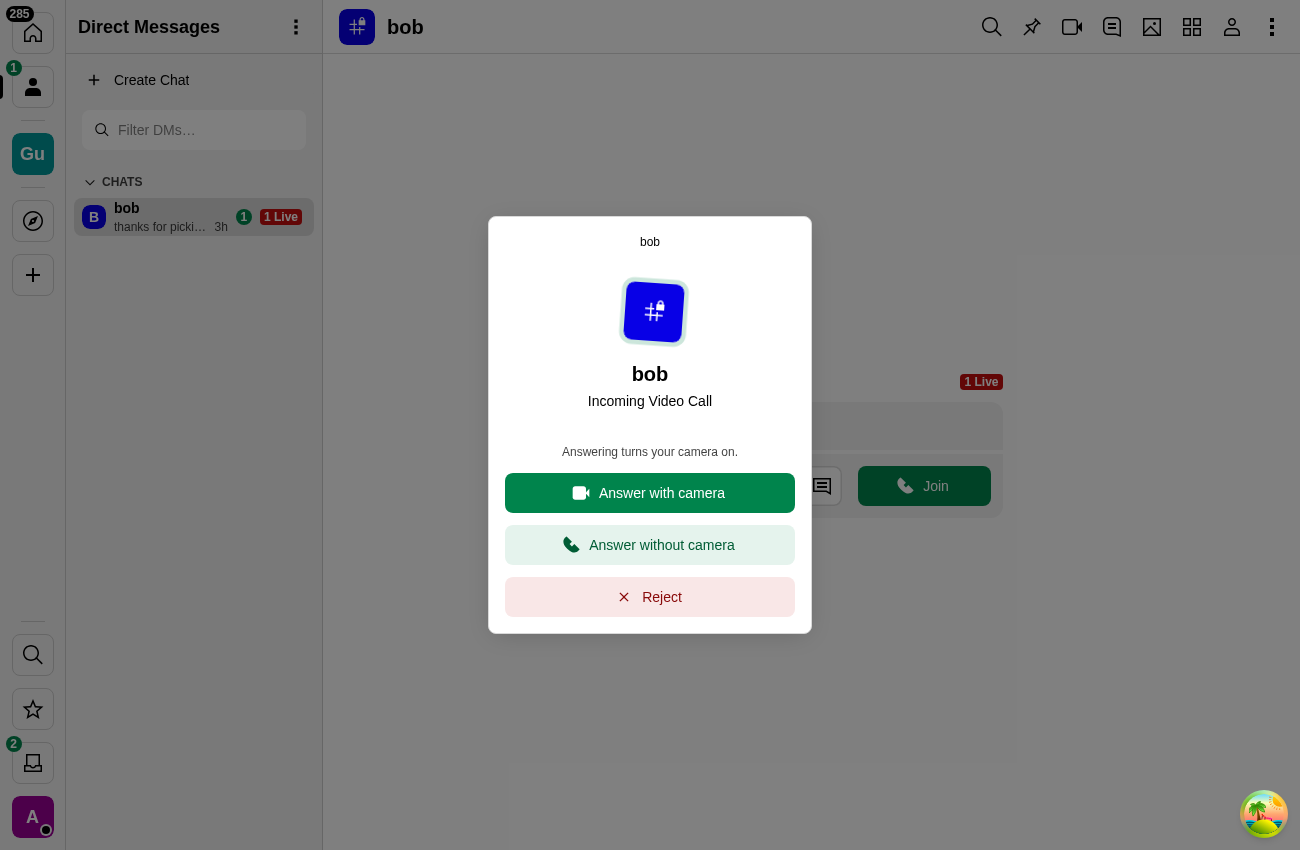
Verified headless: video call + setting on → notice + both buttons; Answer without camera joins with
videoEnabled=false; voice call → plain Answer.