[research] Verification reminder for your OWN unverified sessions #123
Closed
opened 2026-09-17 15:43:35 -04:00 by jared
·
3 comments
No Branch/Tag Specified
lotus
fix/call-theme-before-ready
fix/dfn-worklet-file
test/lotus-feature-e2e
fix/own-presence-display
fix/sso-uia-desktop
seasonal/lunar
seasonal/newyear
seasonal/christmas
chore/build-hygiene
fix/status-save-speed
chore/typing-hygiene
feat/settings-search
feat/settings-pages
chore/security-deps
feat/settings-quick-wins
feat/data-export
feat/stale-sessions
feat/landscape-call
feat/expected-devices
feat/oauth-detect
chore/ec-0.28
chore/sdk-44
feat/key-upload-recovery
feat/keychain-session
feat/vimeo-events
feat/widget-always-on-screen
feat/call-summary-details
feat/widget-popout
fix/ios-long-press
chore/any-cleanup
chore/soundboard-mic-mix
fix/phone-call-controls
fix/a11y-axe-findings
fix/copy-and-reddit-context
feat/about-build-info
fix/schedule-24h
fix/connecting-strip
fix/ui-polish-batch
fix/outbox-multi-tab
fix/widget-share-hardening
fix/side-panel-width
fix/topic-markdown
fix/acl-ip-literals-default
feat/decorations-host
fix/call-disconnected-bar
fix/linux-update-verify
perf/lazy-settings
fix/dnd-busy-presence
fix/threads-stay-unread
fix/private-note-wording
fix/audio-output-frame-ids
fix/pip-minimise
fix/translate-unavailable-copy
fix/status-expiry-account-data
ci/reseed-bundle-budget
fix/close-no-tray
fix/soundboard-not-permitted
fix/denoise-state-notice
docs/features-catchup
fix/desktop-settings-section
fix/dev-denoise-theme
fix/pwa-manifest
fix/translate-feedback
fix/consent-retry-snooze
fix/strip-metadata-packs
fix/preview-deceptive-links
fix/embed-ogurl-provider
fix/settingtile-nesting
fix/shortcuts-dialog
fix/forward-encryption-warning
fix/compress-alpha-anim
fix/screenshare-double-toast
fix/sw-reply-checks
fix/pip-default-position
fix/inapp-toast-permission
fix/mute-timers-account-data
fix/policy-dedupe
fix/nudge-dismissed-strip
fix/kuma-plain-text
fix/rejoin-dm
fix/search-edit-dupes
fix/room-filter-empty
fix/emoji-board-escape
fix/call-failed-retry
fix/share-links-lotus
fix/poll-vote-local-echo
fix/scheduled-from-server
fix/delayed-restart-dedupe
fix/decline-references-notification
fix/stall-watchdog
fix/filtered-timeline-double-count
fix/call-listener-limit
fix/voice-room-no-room-ping
fix/reactions-collapse-loop
fix/group-call-permission
fix/dialog-enter-closes
fix/delivery-status-live
fix/room-upgrade-lotus-state
fix/quiet-hours-tick
fix/logout-wipe-leftovers
fix/inter-font-name
fix/retention-floor-grace
fix/firefox-persist-hang
fix/phantom-ring-after-reload
fix/local-room-names-rest
fix/missed-call-voice-rooms
fix/animated-bg-compositor
fix/link-safety-bypasses
fix/e2e-register-403
fix/local-room-names-everywhere
fix/collapsible-messages
fix/logout-volume-residue
fix/enter-newline-device-local
fix/dnd-restore-status
fix/presence-sticky
fix/location-confirm
fix/reminders-stick
fix/voice-full-distinct-users
fix/presence-pagehide-status
fix/gif-card-aspect
deps/npm-audit-fixes
security-nudge
linux-package-updates
audit-brace-expansion
server-status-banner
desktop-keychain-mirror
desktop-call-origin
clock-skew-lag
offline-outbox
desktop-lotus-links
poll-ui
calls-open-in-browser
screenshare-prompt
call-origin-split
update-packages
sw-fix
read-me-update
image-path-changes
dm-calls
fix-2469
renovate/element-hq-element-call-embedded-0.x
renovate/npm-i18next-http-backend-vulnerability
renovate/npm-vite-vulnerability
dev
docs-update
more-theme
fix-257
imporve-thread-reply
revert-2402-improve-menu-congestion
mxidColor-toggle
update-sw-main-msg
v4.11.1
v4.10.5
v4.10.4
v4.10.3
v4.10.2
v4.10.1
v4.10.0
v4.9.1
v4.9.0
v4.8.1
v4.8.0
v4.7.1
v4.7.0
v4.6.0
v4.5.1
v4.5.0
v4.4.0
v4.3.2
v4.3.0
v4.2.3
v4.2.2
v4.2.1
v4.2.0
v4.1.0
v4.0.3
v4.0.0
v3.2.0
v3.1.0
v3.0.0
v2.2.6
v2.2.5
v2.2.4
v2.2.3
v2.2.2
v2.2.1
v2.2.0
v2.1.3
v2.1.2
v2.1.1
v2.1.0
v2.0.4
v2.0.3
v2.0.2
v2.0.1
v2.0.0
v1.8.2
v1.8.1
v1.8.0
v1.7.0
v1.6.1
v1.6.0
v1.5.1
v1.5.0
v1.4.0
v1.3.2
v1.3.1
v1.3.0
v1.2.1
v1.2.0
v1.1.0
v1.0.0
Labels
Clear labels
a11y
area: appearance
area: auth-session
area: build-ci
area: calls
area: desktop
area: media
area: messaging
area: mobile
area: moderation
area: navigation
area: notifications
area: settings
area: threads
bug
dependencies
docs
duplicate
enhancement
help wanted
invalid
needs-human-review
performance
planning
priority: critical
priority: high
priority: low
priority: medium
qa
question
research
security
tech-debt
ux
wontfix
Accessibility: keyboard, screen reader, contrast, motion
Client area: appearance
Client area: auth-session
Client area: build-ci
Client area: calls
Client area: desktop
Client area: media
Client area: messaging
Client area: mobile
Client area: moderation
Client area: navigation
Client area: notifications
Client area: settings
Client area: threads
Something is not working
Third-party package versions and advisories
README / LOTUS_* docs wrong or missing
This issue or pull request already exists
New feature
Need some help
Something is wrong
Re-render storms, leaks, heavy work on hot paths
Data loss, security hole, or crash on a main path
Broken feature or serious usability problem
Minor issue or polish
Wrong behaviour in an edge case or notable degradation
Manual QA: shipped, needs a human in a real environment
More information is needed
XSS, unsafe URLs, data leaks, auth/session
Code health, dead code, fragile patterns
Usability or visual inconsistency
This won't be fixed
Milestone
No items
No Milestone
Features 2026-Q4
Projects
Clear projects
No projects


Notifications
Due Date
No due date set.
Dependencies
No dependencies set.
Reference: LotusGuild/cinny#123
Reference in New Issue
Block a user
Blocking a user prevents them from interacting with repositories, such as opening or commenting on pull requests or issues. Learn more about blocking a user.
Not other people's devices (that is #113 session hygiene / the existing composer warning). This is: you logged in on a new device, never verified it (no cross-signing signature), and nothing ever tells you — so that device can't read backed-up history and shows as a red shield to everyone else.
Research first (correctness matters — wrong prompts here erode trust)
crypto.getUserDeviceInfo/DeviceVerificationStatus.crossSigningVerifiedfor this device (mx.getDeviceId()), cross-signing set-up state (isCrossSigningReady), secret storage state — enumerate every combination and what the correct nudge is (verify via another device / set up cross-signing / restore from backup), reusing the existing flows incomponents/DeviceVerificationSetup.tsx,BackupRestore.tsx.Deliverable: findings + one design in this issue; implementation after review.
Findings (2026-09-20, code audit)
1. Signals we already compute, and every combination
useCrossSigningActive=m.cross_signing.masteraccount-data present)crypto.getDeviceVerificationStatus(me, myDeviceId).crossSigningVerified→useDeviceVerificationStatus)crypto.getKeyBackupInfo()→useKeyBackupInfo)DeviceVerificationSetup(bootstraps SSSS + cross-signing + backup in one go)VerifyOtherDeviceTile(request from another device) or "Verify Manually" (recovery key/passphrase →ManualVerification, which also restores the backup)Unsupported(getDeviceVerificationStatusreturns null: crypto not ready / no rust store yet)DeviceListChange(already wired)Existing surfaces: the sidebar already shows the red shield tab (
UnverifiedTab.tsx) for case B/C and an orange one for other unverified devices, and Settings → Devices already explains the two paths (Verification.tsx). So "nothing ever tells you" is slightly off — it is a 24 px icon with a tooltip and no words, which is why nobody acts on it.2. Timing
Use the session's creation time (the
sessionsstore keeps it; addcreatedAtif it doesn't survive a reload — it's one field on the persisted session). Rules: show only whennow − createdAt ≥ 24 hand status is B or C (never A during onboarding: the setup dialog is already offered at Settings → Devices, and a first-run nudge collides with the E2EE onboarding), re-show at most every 7 days, stop after 3 dismissals — all three counters inlocalStorageunderlotus-verify-nudge-<deviceId>(per device on purpose; cleared byclearPlaintextCacheson logout). Verified → the record is deleted so a later reset starts fresh.3. Where
Recommendation: a sidebar-bottom banner (same slot and style as the existing unverified-device icon, but with words: "Verify this device — so you can read older messages and others see you as trusted · Verify · Not now") rather than a dot on Settings → Devices. A dot is what we have today in effect, and it doesn't convert. Mobile: the same banner above the composer's room list.
4. One security banner (#110)
Fold both into a single
SecurityBannerwith a priority list:verify-device(B/C) >key-backup(#110's D) > nothing. One banner slot, one dismissal store keyed by banner id, so they never stack and B's dismissal doesn't hide D later.5. OIDC / Authelia
Identical: everything above is client-side rust-crypto state (device signatures, SSSS, backup). The only OIDC-specific wrinkle is account-management redirects for resetting cross-signing (
accountManagementActions.crossSigningResetis already handled inVerification.tsx); the nudge never needs it.Design (one, for review)
hooks/useVerifyNudge.ts: pure decisionshouldShowVerifyNudge({ status, crossSigningActive, sessionCreatedAt, record, now })(unit-tested) + the localStorage record.components/SecurityBanner.tsxrendered once in the sidebar footer, choosing between verify-device and key-backup (#110) content by priority; "Verify" opens Settings → Devices (viasettingsRequestAtom, like #159); "Not now" bumps the dismissal count.~150 lines + tests. Waiting for a go before building (per the issue: implementation after review).
Design review: screenshots of the real client (#110 + #123 together)
These are screenshots of the actual Lotus Chat client, running a prototype on a local branch (
security-nudge) that isn't pushed or deployed.One nudge, three states (priority order)
The primary button opens Settings → Devices (the existing flows). Not now snoozes it.
"Set up" opens Settings → Devices, where Device Verification → Enable sets up verification + backup:
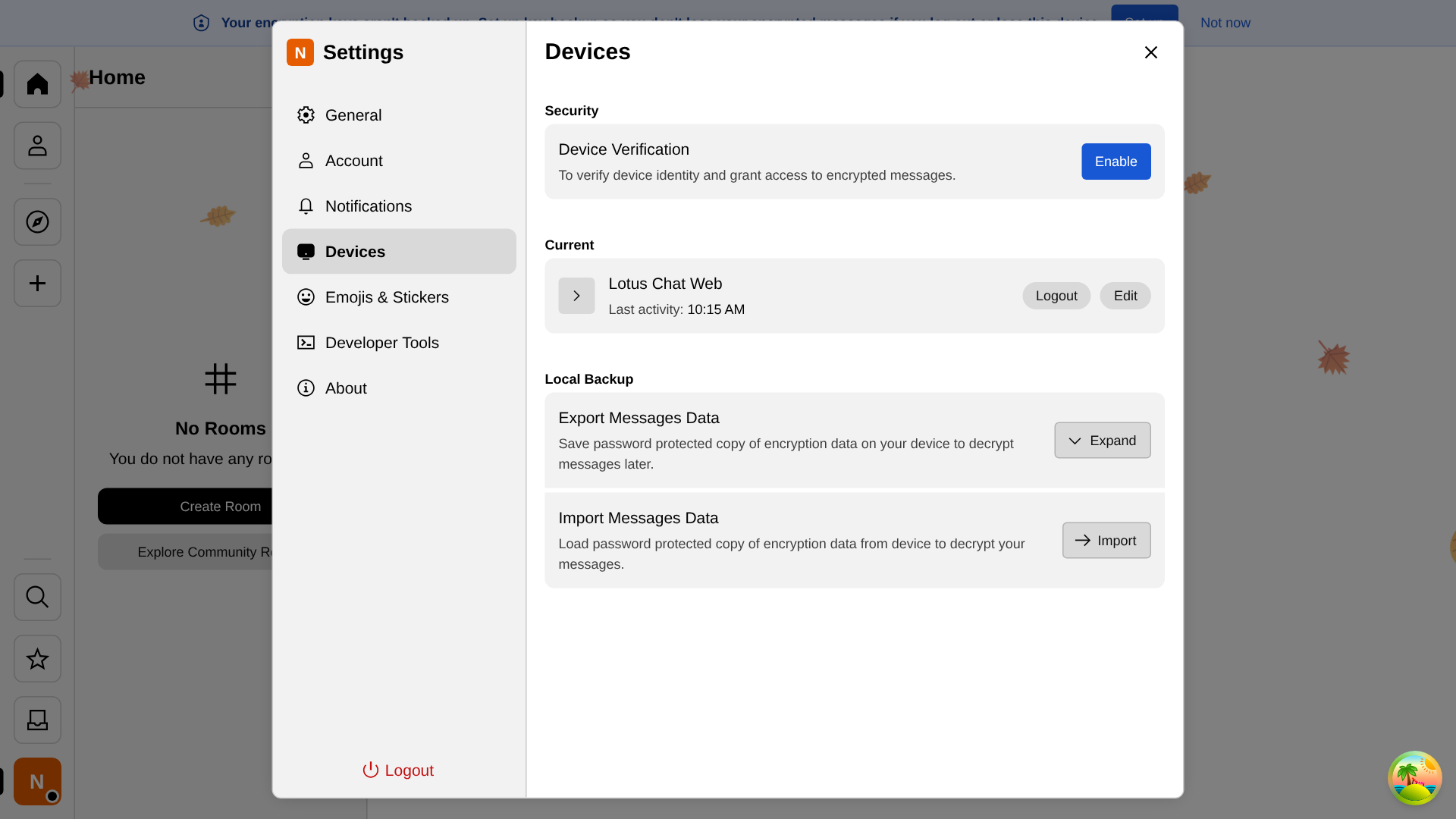
Phone: the full text wraps.

Rules (from the research above)
Found and fixed while making these
Your call
Wording, the 24 h / 7 days / 3 dismissals numbers, and anything about the look. Once you've approved it I'll add end-to-end tests and open the PR.
Shipped in #258 (merged, live on chat.lotusguild.org since 01:05 UTC 2026-10-01). It's one device-security strip for this device. In priority order:
Timing:
Placement: it waits until sync has settled, and outage, maintenance and connection strips take priority.
Tests: 4 unit tests, plus end-to-end tests for the grace period, Set up key backup opening Settings → Devices, and Not now surviving a reload. Verify this device was checked by hand on a second device (screenshots above).